Banner Markers Add-on
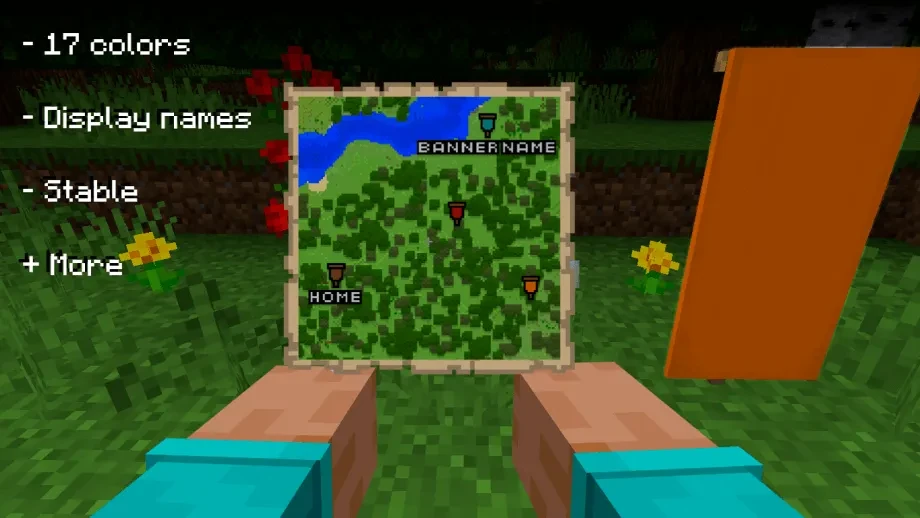
Have you ever wanted to mark your bases, waypoints, farms, and points of interest directly on your in-game maps like in Java Edition?
Banner Markers brings Java Edition style banner waypoints and floating in-world names to Minecraft Bedrock Edition!
Key Features
- Java-Style Banner Markers: Place colored marker icons matching banner colors directly onto filled maps.
- Custom Name Display on Maps: Banners renamed in an anvil have their custom name rendered right beneath the marker icon on the map.
- In-World 3D Floating Names: Named banners display native 3D in-world text labels floating above them.
- All 16 Colors Supported: Full support for every standard Minecraft banner color (White, Orange, Magenta, Light Blue, Yellow, Lime, Pink, Gray, Light Gray, Cyan, Purple, Blue, Brown, Green, Red, Black).
- 100% Entity-Free & Lag-Free: Uses modern Script API text primitives and world coordinate tracking—no invisible dummy entities, hitboxes, or performance drops.
- Automatic Cleanup: Breaking or removing a banner instantly cleans up its map icon and 3D floating text.
How to Use
- Equip Map in Offhand: Place a Filled Map into your offhand slot.
- Hold Banner in Main Hand: Hold any color Banner in your main hand. You can rename the banner first using an Anvil if you want custom text.
- Place the Banner: Place the banner onto the ground or against a wall in the Overworld.
- View on Map & in World: Your map will immediately show the colored banner marker with your custom text underneath, and a clean 3D text label will appear above the banner in the world.
- Remove Markers: Simply break the banner to remove the marker from your map and clear the in-world text.
Requirements
Beta APIs / Experiments
No experimental toggles or Beta APIs required!

Downloads
Banner Markers Add-on
Download the latest version for Minecraft Bedrock Edition.